Bulk launch
Paste your launch plan, products and keywords, and create every campaign of it in one go, paused.
Launching 40 designs with their own keywords takes an afternoon in the console. Here you write the whole launch as one plan, check the preview, and create it in one approval. Open Toolkit → Bulk launch, pick the type of campaign, then the marketplace at the top.
| Type | What each product gets |
|---|---|
| Sponsored Products | The campaigns of your settings: an automatic one, and manual ones with the plan's keywords and ASINs. |
| Sponsored Brands | One video campaign per product, with that product's video. |
1. Your plan
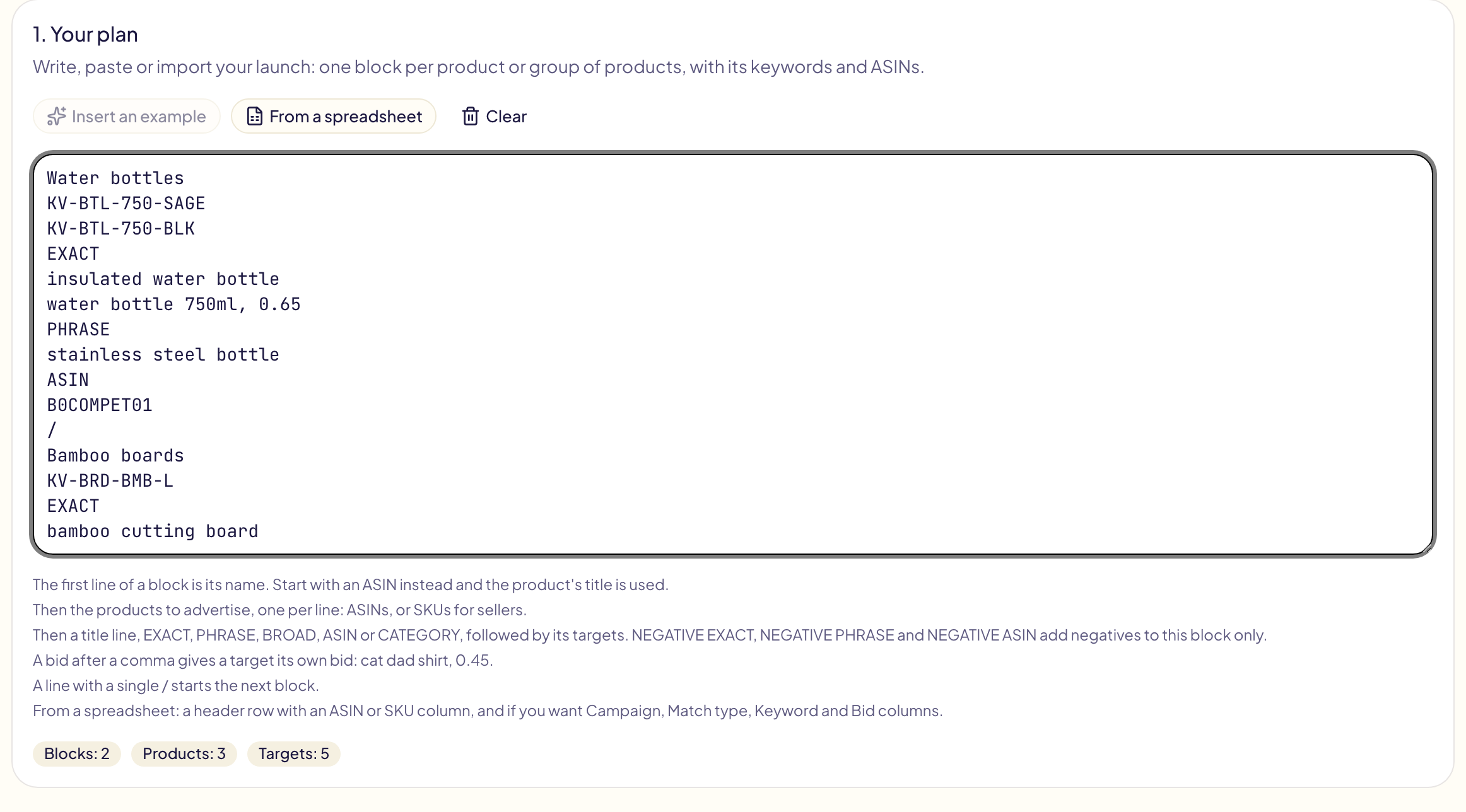
A plan is made of blocks, one per product or group of products:
Funny cat shirts
B0AAAAAAAA
B0BBBBBBBB
EXACT
cat dad shirt
funny cat shirt, 0.45
PHRASE
cat lover gift
ASIN
B0CCCCCCCC
/
Dog lover shirts
B0DDDDDDDD- The first line is the block's name. Start with an ASIN instead and the product's title is used.
- Then the products to advertise, one per line: ASINs, or SKUs for sellers. An Amazon product link works too.
- Then the targets, under a title line:
EXACT,PHRASE,BROAD,ASINorCATEGORY.NEGATIVE EXACT,NEGATIVE PHRASEandNEGATIVE ASINadd negatives to this block only. - A bid after a comma gives a target its own bid.
- Sponsored Brands: a
VIDEO:line, such asVIDEO: cat-film.mp4, gives the block's products that video from your Amazon library. - A
BROAD MODIFIERtitle (orBMM) adds its keywords as broad match modifiers:cat dadbecomes+cat +dad, and every word should be in the shopper's search. Amazon documents it for Sponsored Brands; on Sponsored Products, a few searches without every word can still match. - A line with a single
/starts the next block.
Accents and every language are kept as written. Each line Amazon would refuse is listed under the plan, with its line number, before anything is sent.
From a spreadsheet reads a .csv, .tsv, .txt or .xlsx file in your browser and
writes it as a plan you can edit. It needs a header row with an ASIN or
SKU column. Campaign, Match type, Keyword, Bid and Video
columns are read when present; a match type of bmm or broad modifier is a
broad match modifier. A Productor export (Title and ASIN) gives one block per design.
2. Settings
The settings are the campaigns each block gets, set like a template's campaign. Pick Start from a template to load one of yours: its campaign, names, budget, bids, placements and negatives. Its own keywords are left out, since they come from your plan. Add more campaigns with Add a campaign.
- Campaigns per product: each product gets its own campaigns, or the products of a block share them.
- An automatic campaign is created for every block.
- A manual campaign receives the block's keywords, ASINs and categories. A block with no target gets no manual campaign.
- Split into several campaigns: one campaign per match type, and a maximum number of targets per campaign. With 23 exact keywords and 10 per campaign, you get Exact 01, Exact 02 and Exact 03.
- Bid per match type: the bid of every target with no bid of its own.
Names use the template tokens plus {name}, the block's name. The default name
{name} {asin} - SP {match} {n} gives « Funny cat shirts B0AAAAAAAA - SP Exact 01 ».
3. Preview and launch
Pick a portfolio if you want, then click Preview. It lists every campaign with its products, budget and targets. A campaign name Amazon already has is marked Already there and left as it is.
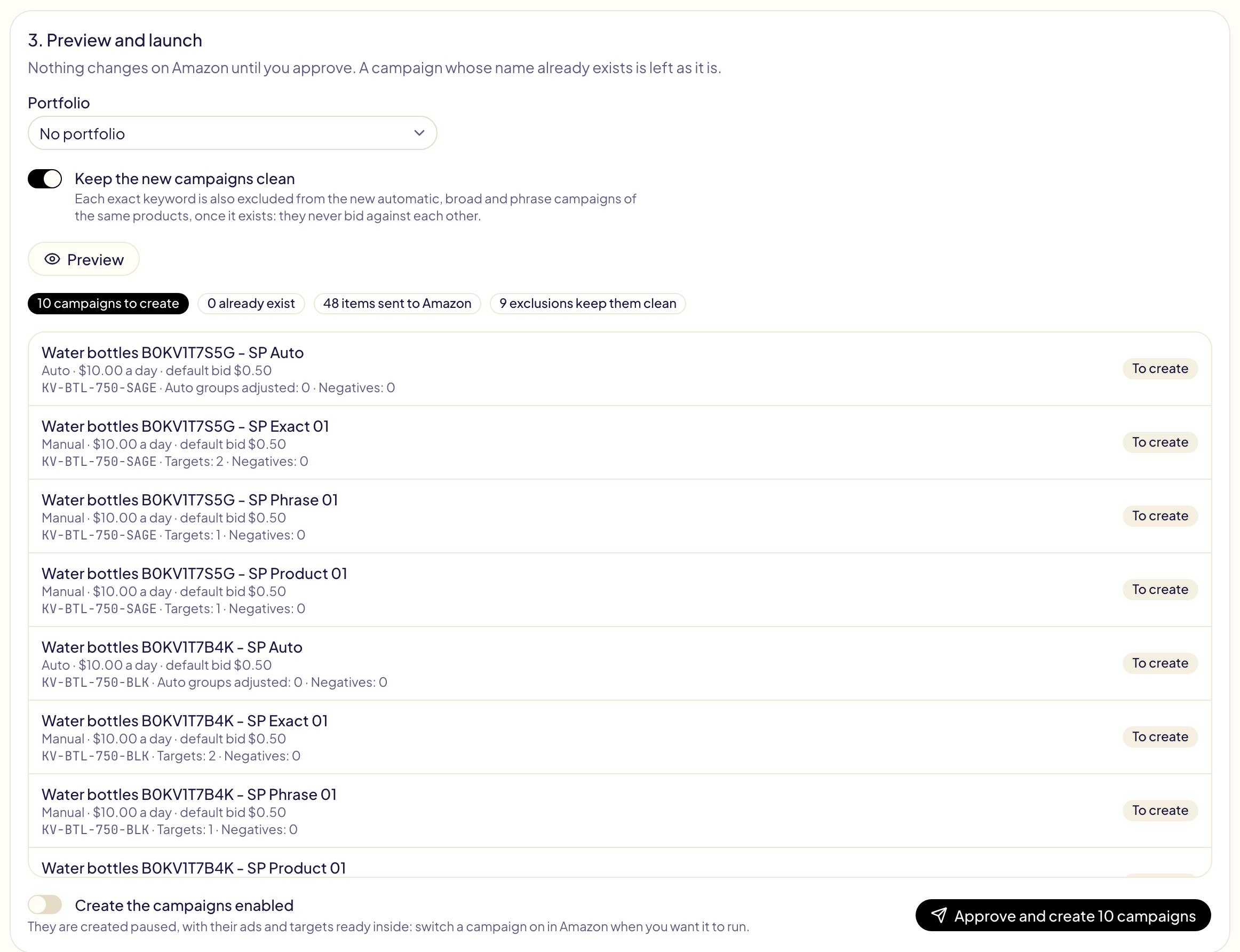
The campaigns are created paused, unless you switch on Create the campaigns enabled. Click Approve and create: the whole launch is one operation in Activity, where Undo archives it.
The preview also counts the campaigns of the marketplace, active or paused, now and after the launch. That is what Amazon's campaign limit counts: archived campaigns don't.
Very big launches
One operation takes at most 5,000 lines: a campaign, an ad group, an ad or a keyword is one line each. A bigger launch is sent in parts of up to 5,000 lines, one every 12 hours, so Amazon never receives thousands of campaigns at once. The preview lists each part and when it starts. A product's campaigns always stay in the same part.
| At most | |
|---|---|
| Products in one launch | 2,000 |
| Parts | 10, so 50,000 lines |
Each part is a line of its own in Activity, with its own Undo. Open a part to see all of them:
- Stop the launch: the parts not started yet are never sent. What the earlier parts created stays.
- Undo the whole launch: every part that started is undone, and the others are never sent.
If Amazon refuses campaigns because your account holds too many, the parts not started yet are never sent, and Notifications tells you. Archive the campaigns you no longer use, or ask Amazon Ads support to raise your limit.
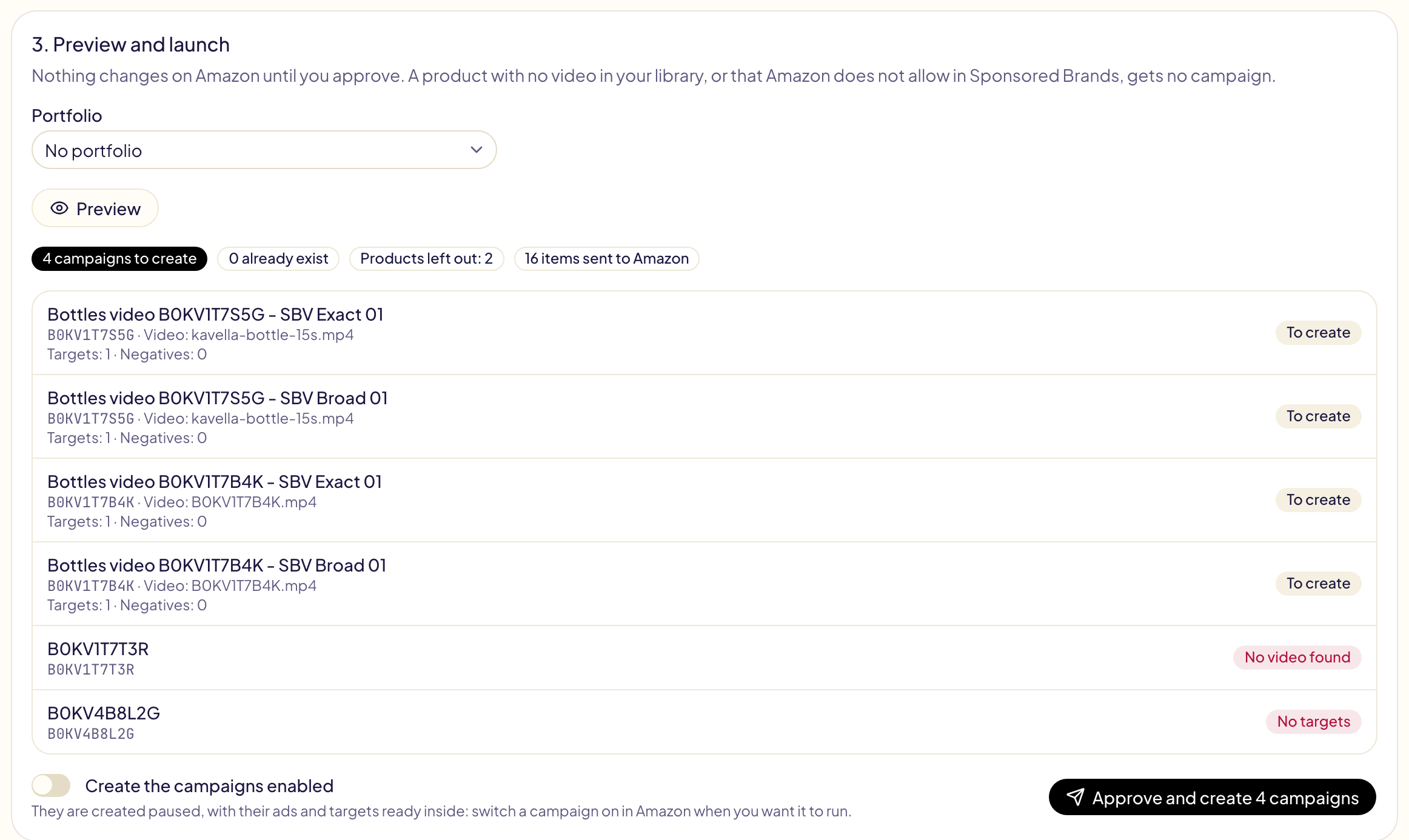
Sponsored Brands video
Each product gets one video campaign per kind of target. A Sponsored Brands campaign targets keywords or products, never both, so the keywords and the ASINs of a block always go to separate campaigns.
A product with no video, or that Amazon does not allow in Sponsored Brands, gets no campaign: the preview says why.
Choose each product's video
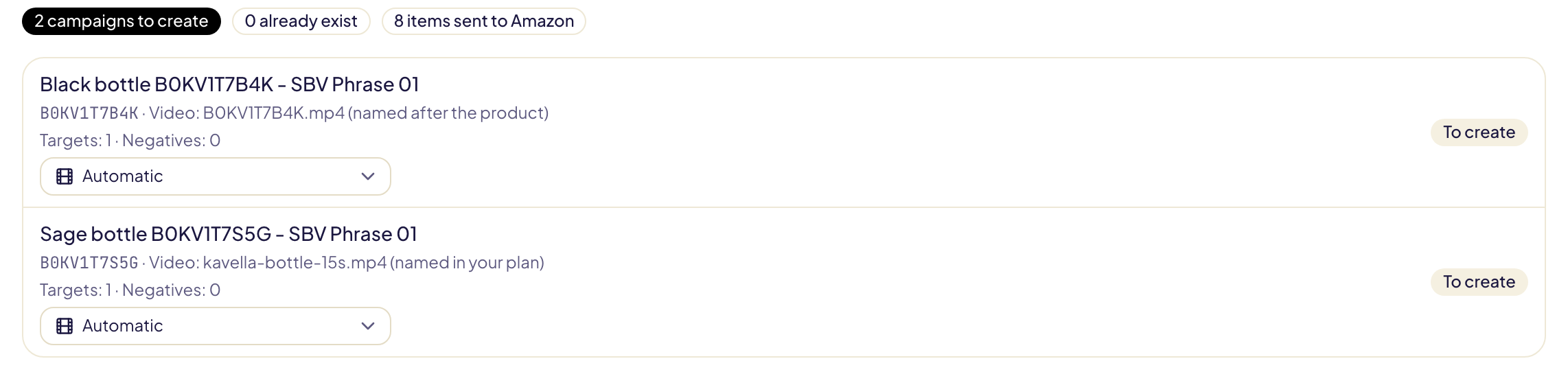
The video comes from your Amazon library for that marketplace, in this order:
- the video you pick in the product's menu, in the preview;
- the video the block's
VIDEO:line names; - a video named after the product's ASIN, such as
B0AAAAAAAA.mp4orB0AAAAAAAA - 15s.mp4; - a video Amazon tied to the product.
Each line of the preview says which video it uses and how it was found. A video you picked or named that is not in the library gives no campaign, rather than another video. Automatic, at the top of the menu, goes back to steps 2 to 4.
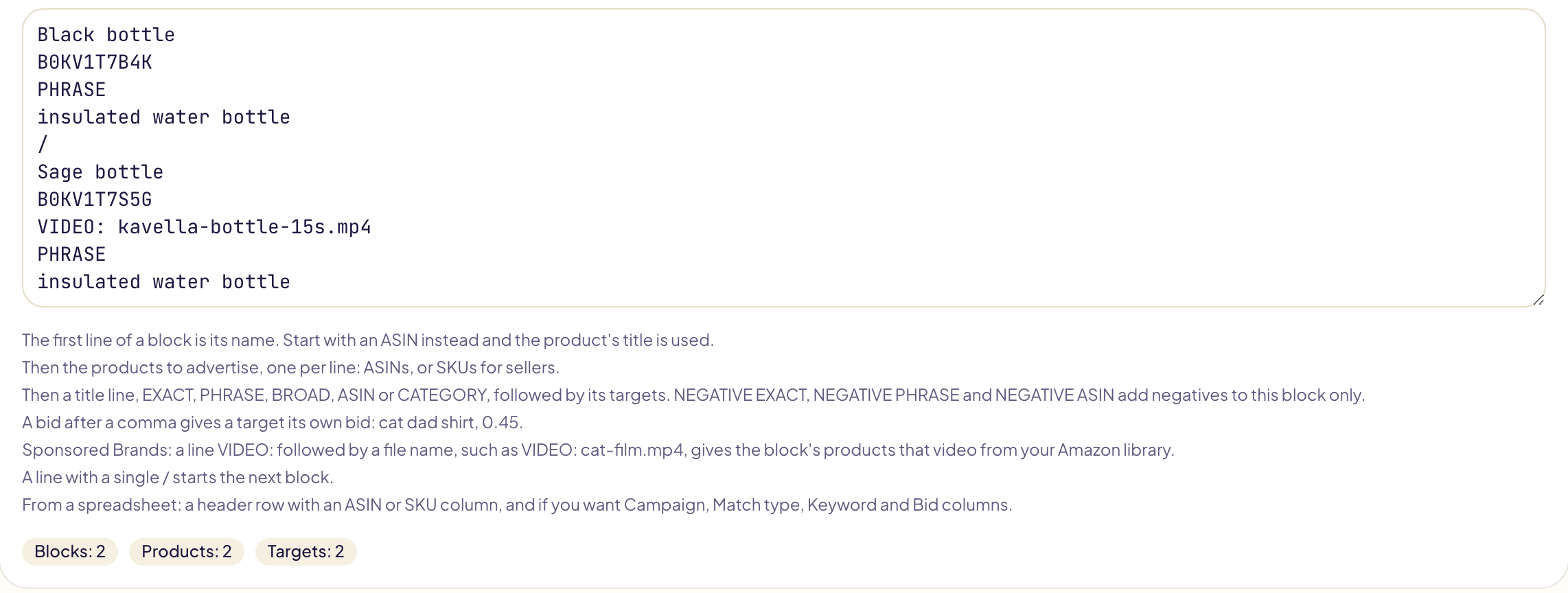
For example, with B0KV1T7B4K.mp4 and kavella-bottle-15s.mp4 in the library:
Black bottle
B0KV1T7B4K
PHRASE
insulated water bottle
/
Sage bottle
B0KV1T7S5G
VIDEO: kavella-bottle-15s.mp4
PHRASE
insulated water bottle- Black bottle has no
VIDEO:line: its product getsB0KV1T7B4K.mp4, the video named after its ASIN. - Sage bottle names its video: its product gets
kavella-bottle-15s.mp4.
The video always goes on a VIDEO: line, and the product it shows is listed in
the block, as an ASIN. A file name on its own line is read as a product, and the
plan says « looks like a video ».
Send your videos to Amazon
Under the preview, Send videos to Amazon takes your video files (MP4 or MOV, 16:9, 6 to 45 seconds, 200 MB at most). Pick the product of each file: a name starting with its ASIN picks it for you. Gloriads sends them to that marketplace's library, tied to their product.
Amazon then processes each video, for up to 30 minutes. Keep the page open: once a video is ready, its product's campaign uses it and the preview updates. Amazon keeps every video of your library for good, it cannot be deleted afterwards.